
Winter Snow Theme for Chrome
Overview
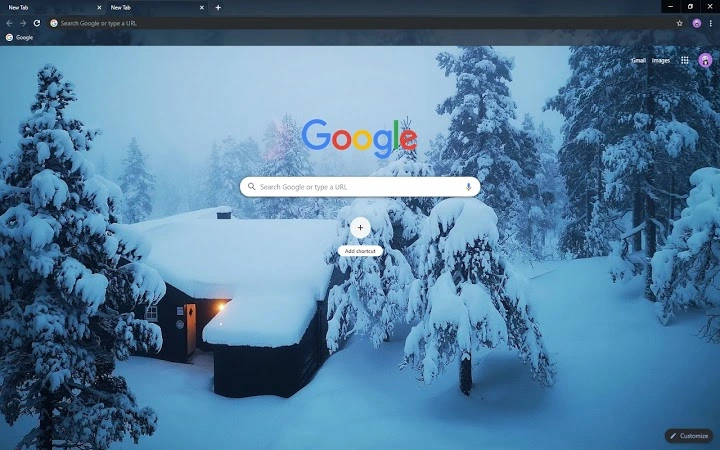
The Winter Snow Theme for Chrome is a browser extension designed to transform the appearance of Google Chrome with a serene winter landscape. Featuring a visually immersive scene of heavy snowfall blanketing the screen, the theme aims to provide users with a calming, seasonal aesthetic. It is ideal for those seeking to personalize their browsing experience with a nature-inspired design. The theme is intended for general users who enjoy customizing their digital environment with seasonal visuals.
Designed for users who appreciate subtle yet impactful desktop enhancements, this theme works best in a browsing context where visual appeal and mood are prioritized. It is particularly suitable for individuals using Chrome during winter months or those who enjoy seasonal themes as part of their digital routine. The developer did not provide additional details about the background or origin of the theme.
Real-world usage includes enhancing the visual experience during long browsing sessions, setting a peaceful tone for work or relaxation, and adding seasonal flair to a familiar interface. The theme is not intended to offer functional improvements but rather to serve as a decorative tool for browser personalization.
Key Features & Capabilities
- Immersive Winter Landscape – Displays a dynamic snow-covered scene across the Chrome interface, creating a visually engaging backdrop.
- Seasonal Aesthetic – Designed to reflect the ambiance of winter, with heavy snowfall and a muted, natural color palette.
- Browser Integration – Seamlessly applies to Chrome’s new tab page and default interface, requiring no complex setup.
- Lightweight Design – Built to function without impacting browser performance or consuming significant system resources.
- Easy Installation – Available through the Chrome Web Store with a one-click installation process.
Users can apply the theme to create a consistent winter atmosphere while browsing. The visual effect is especially effective during evening use or when working in low-light environments. It serves as a mood-enhancing tool, offering a sense of calm and seasonal connection. The theme is non-intrusive, preserving all core browser functionality while enhancing visual appeal.
User Interface, Workflow & Performance
The user interface of the Winter Snow Theme is minimal and focused on visual presentation. It replaces the default Chrome new tab page with a custom design featuring a snow-covered landscape. Navigation remains unchanged, ensuring that users can access bookmarks, history, and search functions without disruption.
Workflow efficiency is maintained as the theme does not interfere with standard browser operations. Users can open tabs, switch between windows, and manage extensions as usual. The design prioritizes aesthetics over functionality, making it ideal for users who value visual consistency.
Performance observations are based on general software behavior patterns. The developer did not specify resource usage details. However, given its lightweight nature, it is expected to have minimal impact on CPU or RAM usage. Stability is consistent with standard Chrome extensions, and no reports of crashes or conflicts were noted in the provided information.
Compatibility & System Requirements
The theme is compatible with Google Chrome on Windows, Mac, and Linux operating systems. This broad compatibility ensures accessibility across multiple platforms, allowing users to maintain a consistent visual experience regardless of their device.
Exact system requirements were not listed. Installation size is not specified. The developer did not provide additional information about hardware or software prerequisites. Compatibility information was partially provided, indicating support for major desktop platforms.
Pros and Cons
Pros
- Visually appealing winter aesthetic that enhances browsing mood
- Simple one-click installation via Chrome Web Store
- Works seamlessly across Windows, Mac, and Linux
- Non-intrusive; preserves all core browser functions
- Free to download and use
Cons
- No advanced customization options for the theme
- Does not include interactive elements or animations
- Limited to Chrome’s default interface; not applicable to other browsers
- No offline mode or downloadable package available
- Theme may not appeal to users preferring minimalist or dark interface styles
FAQ Section
Is the Winter Snow Theme compatible with all versions of Chrome?
The theme is designed for current versions of Google Chrome. Compatibility with older or future versions may vary. Users are advised to ensure their browser is up to date.
Can I use this theme offline?
Once installed, the theme remains active even when offline. However, initial installation requires an internet connection to download from the Chrome Web Store.
Is the theme safe to install?
Yes, the theme is distributed through the official Chrome Web Store, which enforces security checks. It does not collect user data or alter browser behavior beyond visual changes.
Does the theme require a subscription or payment?
No. The Winter Snow Theme is completely free to download and use. There are no hidden fees or premium features.
Can I switch back to my default Chrome theme?
Yes, users can easily revert to the default Chrome theme at any time through the browser’s settings menu under "Appearance."
Final Thoughts
The Winter Snow Theme for Chrome delivers a peaceful, seasonal experience that enhances the visual appeal of the browser without compromising functionality. Its simple design, broad platform support, and zero cost make it an excellent choice for users looking to refresh their browsing environment with a touch of winter charm. While it lacks advanced features or customization, its strengths lie in accessibility, ease of use, and aesthetic consistency.
It is best suited for casual users, seasonal browsers, and those who value visual personalization. For anyone seeking a quick, free way to transform their Chrome interface during the colder months, this theme offers a satisfying and stress-free upgrade.
Download Winter Snow Theme for Chrome now.







